AEC Ref/In
Overview
Properties
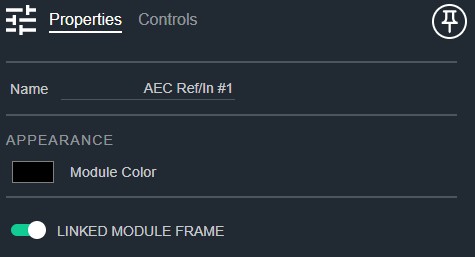
- Name: Type here to change the module name
- Appearance: Click on the colored box to change the module color
- Linked Module Frame: Determines if this module should be included in the automatic linked module frame. Default: Enable
Controls
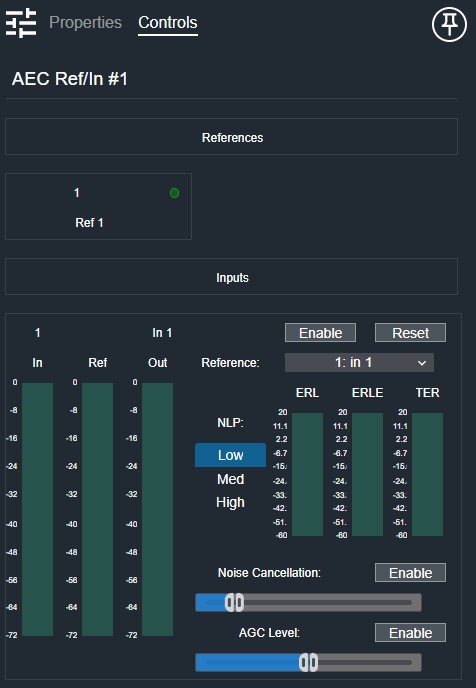
Per local reference:
- Meter (LED, read-only): Audio level indicator for this reference signal.
Per input:
- Enable (Button, toggle): Enables acoustic echo cancellation for this input.
- Reset (Button, momentary): Resets the AEC filter adaptation for this input.
- Input Meter (Meter): Displays the pre-AEC input signal level.
- Selected Reference Meter (Meter): Displays the level of the selected reference signal.
- Output Meter (Meter): Displays the post-AEC output signal level.
- Reference Select (Drop List): Selects the reference signal used for echo cancellation.
- ERL Meter (Meter): Displays the Echo Return Loss measurement.
- ERLE Meter (Meter): Displays the Echo Return Loss Enhancement measurement.
- TER Meter (Meter): Displays the Total Echo Reduction measurement.
- Noise Cancel Enable (Button, toggle): Enables noise cancellation processing.
- Noise Cancellation (Fader): Adjusts the amount of noise cancellation applied.
- AGC Enable (Button, toggle): Enables automatic gain control.
- AGC Level (Fader): Sets the target output level for AGC.
I/O
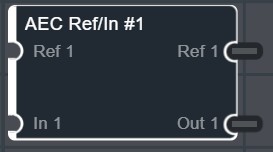
- Ref (Input, Audio): 1–64 signals, 1 channel
- In (Input, Audio): 1–64 signals, 1 channel
- Ref (Output, Audio): 1–64 signals, 1 channel
- Out (Output, Audio): 1–64 signals, 1 channel