Send Text
Overview
Properties
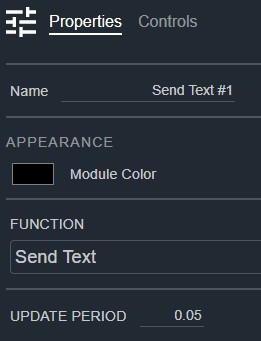
- Name: Type here to change the module name
- Appearance: Click on the colored box to change the module color
- Function: Selects a pre-built Intelligent Module, or build a custom one. Default: Send Text. Options: Custom|Sequencer|Threshold Detector|Ramp Processor|Counter|Scaler|Send Text|AV Ops Send|AV Ops Receive
- Update Period: The rate that the control logic will update, 1 ms to 1 day in seconds. Default: .05. Range: 0.01–86400
Controls
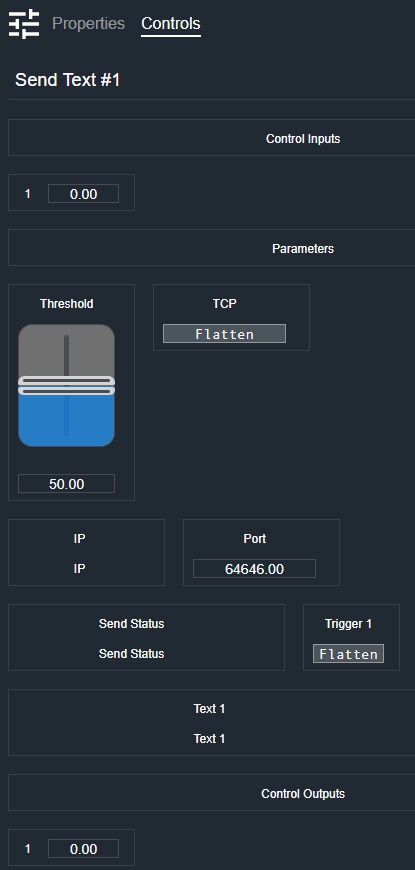
Audio inputs section (shown when Audio Inputs is enabled):
Per audio input:
- AudioIn (Meter, read-only): Displays the audio input signal level.
Control inputs section:
Per control input:
- Level (Numeric, read-only): Displays the current control input signal value.
Parameters section (shown when parameters are defined by the script):
Per parameter (controls depend on parameter type):
- Value (Fader): Adjusts the parameter value. Shown for numeric and continuous parameters.
- Value Readout (Numeric): Displays the current parameter value. Shown for numeric and continuous parameters.
- Value (Button, toggle): Sets the parameter state. Shown for boolean parameters.
- Value Readout (Numeric, read-only): Displays the current parameter value. Shown for read-only parameters.
- Value (LED): Indicates the parameter state. Shown for LED/indicator parameters.
Control outputs section:
Per control output:
- Level (Numeric, read-only): Displays the current control output signal value.
Status:
- Status (LED, read-only): Indicates script execution status.
I/O
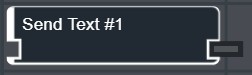
- A-In (Input, Audio): 0–64 signals, 1–64 channels
- In (Input, Control): 1–64 signals, 1 channel
- A-Thru (Output, Audio): 0–64 signals, 1–64 channels
- Out (Output, Control): 1–64 signals, 1 channel