Gating Automixer
Overview
The Gating Automixer opens microphones automatically for whoever is talking and holds the rest down, so unused mics do not add noise or contribute to feedback. Each channel is gated on or off, and the NOM Limit caps how many mics can be open at once (NOM stands for "number of open mics"). When the limit is reached, a mic with a strictly higher priority takes the slot from the open mic with the lowest priority.
Use this module for a single room or a single signal path. To share one set of gating decisions across several signal paths, use the Multi-room Gating Automixer instead.
Properties
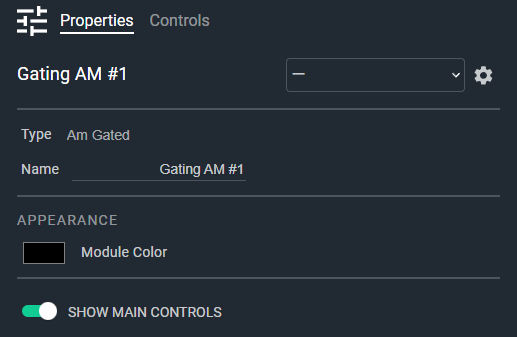
- Name: Type here to change the module name
- Appearance: Click on the colored box to change the module color
- Show Main Controls: Determines if the main controls are shown; when disabled only the channel strips are shown. Default: Enable. Options: Disable|Enable
Controls
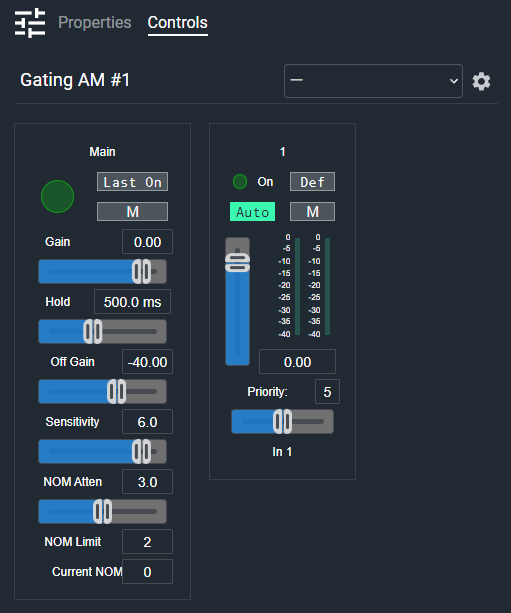
Main section (shown when Show Main Controls is enabled):
- Mix Meter (LED, read-only): Audio level indicator for the automixed output.
- Last On (Button, toggle): Keeps the most recently open microphone open when no channel is active. Turning on Last On clears every channel's Default button.
- Main Mute (Button, toggle): Mutes the mix output.
- Main Gain Readout (Numeric): Displays the main gain value. Type a value or use the Gain fader. Range: -72 to +12 dB, off at minimum.
- Main Gain (Fader): Adjusts the overall mix output gain.
- Main Hold Readout (Numeric): Displays the gate hold time. Range: 0.1 to 5 seconds. Default: 0.5 seconds.
- Main Hold (Fader): Sets how long a channel stays open after the talker stops.
- Main Off Gain Readout (Numeric): Displays the off-state gain value. Range: -90 to -10 dB. Default: -40 dB.
- Main Off Gain (Fader): Sets the gain applied to closed microphone channels.
- Main Sensitivity Readout (Numeric): Displays the gate sensitivity. Range: 3 to 25 dB. Default: 6 dB.
- Main Sensitivity (Fader): Sets how far a channel's level must rise above the background level before it opens.
- Main NOM Atten Readout (Numeric): Displays the NOM attenuation value. Range: 0 to 6 dB per doubling of open mics. Default: 3 dB.
- Main NOM Atten (Fader): Sets how much the mix is turned down as more microphones open.
- Main NOM Limit Readout (Numeric): Sets the maximum number of microphones open at once. Range: 1 to 512. Default: 2.
- Current NOM (Numeric, read-only): Displays the number of microphones currently open.
Per channel:
- On (LED, read-only): Indicates whether this channel is currently open. Also lit when Auto is off, and dark when the channel is muted.
- Default (Button, toggle): Sets this channel as the default microphone, held open when no channel is active. Only one channel can be the default, and choosing one turns off Last On.
- Auto (Button, toggle): Enables automatic gating for this channel. When off, the channel passes at its fader gain and does not count toward the NOM Limit. Default: Enabled.
- Mute (Button, toggle): Mutes this channel.
- Gain (Fader): Adjusts this channel's gain. Range: -72 to +12 dB, off at minimum.
- Input Meter (Meter, read-only): Displays the input level for this channel.
- Gain Meter (Meter, read-only): Displays the gain the automixer is applying to this channel.
- Gain Readout (Numeric): Displays the current gain value for this channel.
- Priority (Numeric): Displays the gating priority for this channel. Range: 0 to 10. Default: 5.
- Priority (Fader): Sets the gating priority for this channel.
- Scribble (Text): Names this channel. Default: In 1, In 2, and so on.
I/O
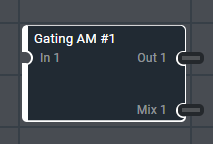
- In (Input, Audio): 1–64 signals, 1 channel
- Out (Output, Audio): 1–64 signals, 1 channel
- Mix (Output, Audio): 1 signal, 1 channel