Gain-sharing Automixer
Overview
The Gain-sharing Automixer mixes microphones automatically by sharing gain continuously between channels instead of switching them on and off. The loudest channel gets the most gain, and the rest are turned down in proportion to how far below it they are. Because nothing gates, there is no on/off transition to hear and no limit on how many mics can contribute.
Use this module for a single room or a single signal path. To share gain across several signal paths, use the Multi-room Gain Sharing Automixer instead.
Properties
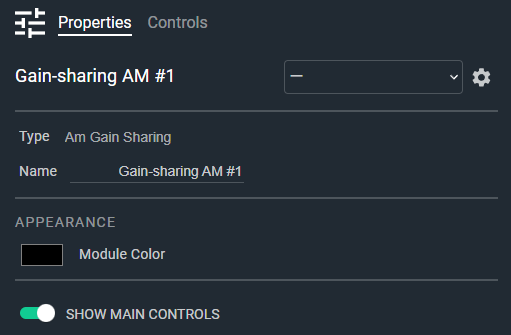
- Name: Type here to change the module name
- Appearance: Click on the colored box to change the module color
- Show Main Controls: Determines if the main controls are shown; when disabled only the channel strips are shown. Default: Enable. Options: Disable|Enable
Controls
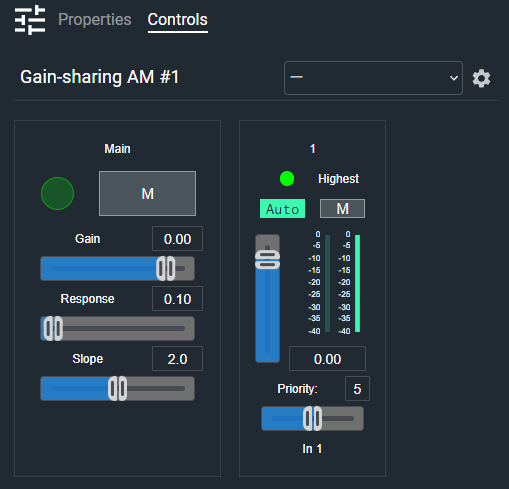
Main section (shown when Show Main Controls is enabled):
- Mix Meter (LED, read-only): Audio level indicator for the automixed output.
- Main Mute (Button, toggle): Mutes the mix output.
- Main Gain Readout (Numeric): Displays the main gain value. Type a value or use the Gain fader. Range: -72 to +12 dB, off at minimum.
- Main Gain (Fader): Adjusts the overall mix output gain.
- Main Response Readout (Numeric): Displays the gain-sharing response time. Range: 0.005 to 5 seconds. Default: 0.1 seconds.
- Main Response (Fader): Sets how quickly gain follows changes in level. Shorter values track speech more tightly; longer values ride over syllables more smoothly.
- Main Slope Readout (Numeric): Displays the gain-sharing slope value. Range: 1.0 to 3.0. Default: 2.0.
- Main Slope (Fader): Sets how sharply gain falls away from the loudest channel. Higher values turn quieter channels down harder.
Per channel:
- Highest Gain (LED, read-only): Indicates that this channel currently has the highest gain in the mix.
- Auto (Button, toggle): Enables automatic gain sharing for this channel. When off, the channel passes at its fader gain and does not affect the gain calculation for other channels. Default: Enabled.
- Mute (Button, toggle): Mutes this channel.
- Gain (Fader): Adjusts this channel's gain. Range: -72 to +12 dB, off at minimum.
- Input Meter (Meter, read-only): Displays the input level for this channel.
- Gain Meter (Meter, read-only): Displays the gain the automixer is applying to this channel.
- Gain Readout (Numeric): Displays the current gain value for this channel.
- Priority (Numeric): Displays the priority for this channel. Range: 0 to 10. Default: 5.
- Priority (Fader): Sets the priority for this channel. A higher priority channel holds more gain than a lower priority channel at the same level.
- Scribble (Text): Names this channel. Default: In 1, In 2, and so on.
I/O
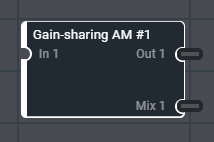
- In (Input, Audio): 1–64 signals, 1 channel
- Out (Output, Audio): 1–64 signals, 1 channel
- Mix (Output, Audio): 1 signal, 1 channel