Tone Generator
Overview
Properties
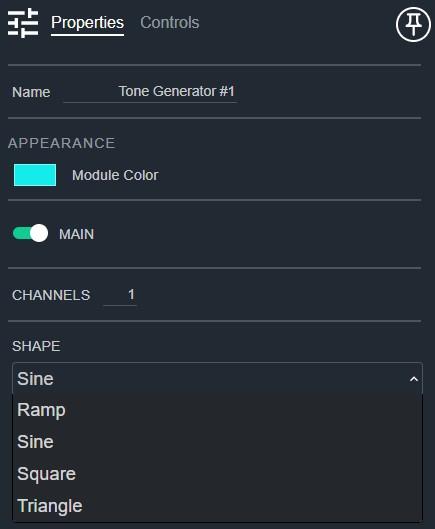
- Name: Type here to change the module name
- Appearance: Click on the colored box to change the module color
- Main: Determines if there is a main channel control strip. Default: Enable
- Channels: The number of channels in each signal. Default: 1. Range: 1–64
- Shape: The shape of the waveform generated. Default: Sine. Options: Ramp|Sine|Square|Triangle Options: Ramp|Sine|Square|Triangle
Controls
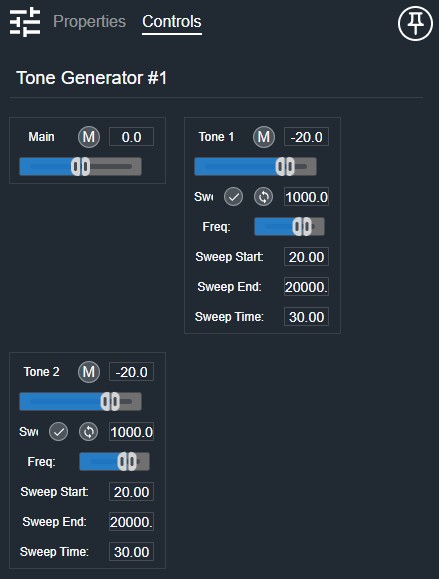
Main section (shown when Main is enabled):
- Mute (Button, toggle): Mutes all channels simultaneously.
- Gain Readout (Numeric): Displays the main gain value.
- Gain (Fader): Adjusts the overall output gain.
Per channel:
- Mute (Button, toggle): Mutes this channel.
- Level Readout (Numeric): Displays the current level value.
- Level (Fader): Adjusts the tone generator output level.
- Sweep (Button, toggle): Enables frequency sweep mode.
- Repeat (Button, toggle): Enables sweep repeat mode.
- Current Frequency (Numeric, read-only): Displays the current tone frequency.
- Frequency (Fader): Sets the tone frequency.
- Sweep Start (Numeric): Sets the sweep start frequency.
- Sweep End (Numeric): Sets the sweep end frequency.
- Sweep Time (Numeric): Sets the duration of the frequency sweep.
I/O
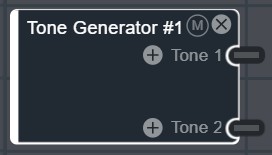
- Tone (Output, Audio): 1–64 signals, 1–64 channels