Room Combiner
Overview
The Room Combiner handles audio for spaces divided by movable walls, such as ballrooms and conference suites. Give it one Room input per room, counting the rooms with every wall closed, then turn combine buttons on or off as walls open and close. When rooms are combined, their Room inputs are mixed together and the mix is sent to the Room output of every combined room. A room that is not combined passes its own input straight through to its own output.
Each room also has a BGM output that carries one of the shared BGM (background music) inputs, with its own source selection, volume and mute. The Room and BGM outputs stay separate so you can duck or process the background music before mixing it into the room's speakers.
How combining works:
- Each combine button (C 1, C 2, and so on) joins the pair of rooms set by its Room A and Room B numbers. By default the buttons cover every possible pair in order (1 and 2, 1 and 3, and so on, then 2 and 3), so change the numbers to match the walls that can actually open.
- Rooms can be combined indirectly. If rooms 1 and 2 are combined and rooms 2 and 3 are combined, rooms 1 and 3 are combined too. You do not need a button for every pair.
- While rooms are combined, their Volume, BGM Volume, mute and Source controls are linked. Changing one room changes every room it is combined with. When you separate the rooms, each one keeps the shared settings and then operates independently.
- When rooms are first combined, each linked control takes the lowest setting among them: the lowest volume, the lowest-numbered BGM source, and unmuted if any of the rooms was unmuted.
- Combining, separating and level changes fade smoothly rather than switching abruptly.
Properties
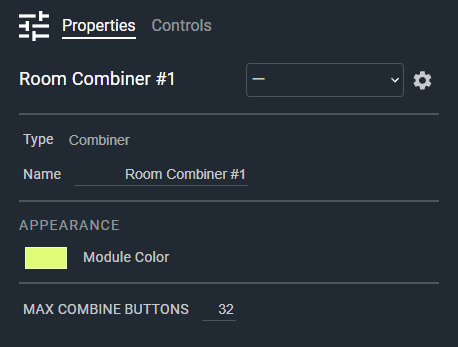
- Name: Type here to change the module name
- Appearance: Click on the colored box to change the module color
- Max Combine Buttons: Maximum number of combine buttons. The module provides one button for each possible pair of rooms, up to this limit. Default: 32. Range: 1–100
Controls
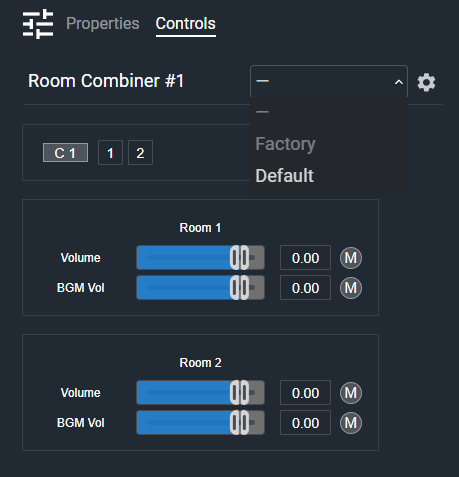
Per combine button:
- C 1, C 2, and so on (Button, toggle): Combines the two rooms set by this button's Room A and Room B. Turn it off to separate them.
- Room A (Numeric): Sets the first room this combine button joins. Range: 1 to the number of rooms.
- Room B (Numeric): Sets the second room this combine button joins. Range: 1 to the number of rooms.
Once you change a button's Room A or Room B, both numbers stay as you set them when the number of rooms changes. A number that falls outside the new room count reverts to the default pairing.
Per room (grouped under a Room 1, Room 2, and so on heading):
- Volume (Fader): Sets the level of this room's Room output, from -72 dB (off) to +12 dB.
- Volume (Numeric): Displays the level of this room's Room output.
- M (Button, toggle): Mutes this room's Room output.
- BGM Volume (Fader): Sets the level of this room's BGM output, from -72 dB (off) to +12 dB.
- BGM Volume (Numeric): Displays the level of this room's BGM output.
- M (Button, toggle): Mutes this room's BGM output.
Per room BGM source (shown when there are two or more BGM inputs):
- Source (Drop List): Selects which BGM input feeds this room's BGM output.
- Previous (Button, momentary): Selects the previous BGM input. Stops at the first input, and repeats while held.
- Next (Button, momentary): Selects the next BGM input. Stops at the last input, and repeats while held.
I/O
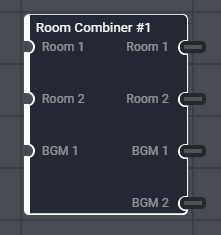
- Room (Input, Audio): 1–32 signals, 1–64 channels
- BGM (Input, Audio): 1–64 signals, 1–64 channels
- Room (Output, Audio): 1–32 signals, 1–64 channels
- BGM (Output, Audio): 1–32 signals, 1–64 channels
Each Room input signal is one room. The Room and BGM outputs always have one signal per room, matching the number of Room inputs. The Room outputs take the channel width of the Room inputs, and the BGM outputs take the channel width of the BGM inputs, so a stereo BGM source produces stereo BGM outputs.
The Room inputs and the BGM inputs are each limited to 128 channels in total (signals multiplied by channels). If a configuration exceeds this, the module reduces the channel width and logs an error.