Select Network(s) Dialog
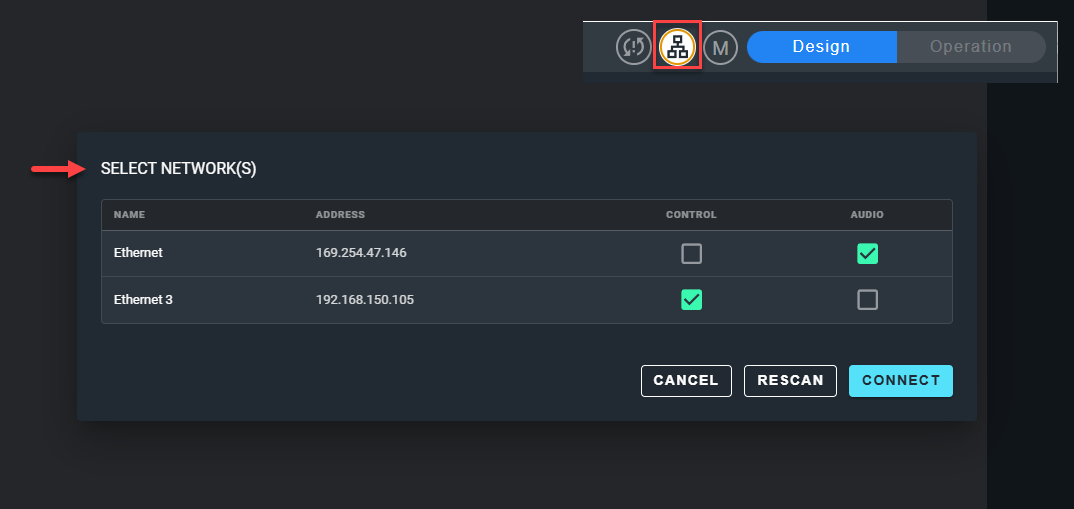
The Select Network(s) dialog sets which of your computer's networks Cognio uses to find and control devices, and which it uses for Dante audio.
To open the dialog, click the Network indicator in the Navigation Bar.
Network Table
Every network adapter seen by the computer is listed with its Name and Address (IP address). Use the checkboxes in each row to choose how Cognio uses that network.
| Column | Description |
|---|---|
| Control | The network to use for searching, pairing, syncing, and communicating with devices. |
| Audio | The network to use for Dante audio. |
- Only one network can be selected for Control. Selecting a different network clears the previous selection.
- Only one network can be selected for Audio. Selecting a different network clears the previous selection. Cognio does not currently support more than one Dante network.
- The same network can be selected for both Control and Audio.
Buttons
- Connect - Confirms your changes and closes the dialog.
- Cancel - Closes the dialog without using the changes you made.
- Rescan - Rescans the computer to find new or changed networks. Any selections you have made in the dialog are kept, including for a network whose IP address has changed.