Multi-room Gating Automixer
Overview
The Multi-room Gating Automixer opens microphones automatically for whoever is talking and holds the rest closed, so unused mics do not add noise or contribute to feedback. Each channel is gated hard on or off, and the number of mics open at once is capped by the NOM limit (NOM stands for "number of open mics").
What makes this module different from a single-room automixer is that up to 16 signal paths running it can act as one automixer: one leader plus up to 15 followers, covering up to 1024 microphones. The group shares one set of gating decisions, one NOM limit and one priority ranking, so a loud talker in one room does not open mics in another, and the group never exceeds the limit you set.
A single module works on its own as well. Leave Mode set to Leader with nothing connected to it, or set it to Stand-alone, and the module gates only its own mics.
Note
The module coordinates decisions, not audio. Each signal path produces its own Mix output with its own main gain and mute already applied, and the module never sums the group's audio together. Combine mixes downstream if you need them combined. This is what lets two rooms share one automixer while their audio stays separate, or gets combined only some of the time.
How Gating Works
Each channel has a detector that watches for speech. When a channel rises far enough above its own background noise, it asks to open. The module then decides which of the requesting mics actually open:
- NOM Limit caps how many mics are open at once across the whole group.
- Priority ranks channels from 0 to 10. When the limit is already reached, a mic takes a slot from the open mic with the lowest priority only if its own priority is strictly higher. Equal priority does not bump, so an already-open mic keeps its slot against an equal challenger and two similar mics do not trade the slot back and forth.
- Hold keeps a mic open for a set time after the talker stops.
- Off Gain sets how far down a closed channel is turned, rather than muting it completely.
- Sensitivity sets how far above its measured noise floor a channel must rise before it opens.
- NOM Atten turns the mix down slightly as more mics open, keeping total gain roughly constant. The value is the attenuation applied per doubling of the number of open mics.
- Last On and the per-channel Def buttons keep one mic open when nothing else is, so the room is never completely dead. They work as a group: turning on Last On clears every Def button, and choosing a Def channel clears Last On. Leaving both off allows all mics to close when nobody is talking.
Test With Speech, Not Steady Tones
The gate threshold adapts to noise: the module continuously measures each channel's background level and opens the mic only when the signal rises meaningfully above it. Speech works because it dips between syllables, which keeps re-measuring that floor. A continuous tone or continuous noise has no dips, so the threshold climbs to meet it and the mic closes after roughly seven seconds while the signal is still present. That is the detector working correctly. Use speech, program material, or bursts of about 1 to 2 seconds on and 0.5 seconds off when you check gating behavior. Continuous signals are fine for checking routing, metering and levels.
Multi-room Operation
Modes
The Mode droplist at the top of the module's controls sets the role of that signal path:
- Stand-alone — the module gates its own mics and ignores any group.
- Leader — the module makes the gating decisions for the whole group. This is the default, and a leader with no followers behaves exactly like a stand-alone automixer.
- Follower 1 through Follower 15 — the module contributes its mics to the group and applies the leader's decisions.
Give every follower in a group a different follower number. The number comes from the Mode droplist, not from how you wire the modules.
Connecting a Group
Connect the leader's Lead control output to each follower's Follow control input. That single connection per follower is the whole setup — no audio is exchanged between signal paths for the automixer to do its job.
You can also chain followers. A follower passes the leader's information along on its own Lead output, so you can wire leader to follower A, then follower A to follower B, instead of running every connection back to the leader. A chained follower still reports to the original leader, not to the follower it hangs off.
Routing a module's own Lead output back to its own Follow input, directly or through a selector, is rejected. A module cannot follow itself.
What the Group Shares
| Setting or behavior | Scope |
|---|---|
| NOM Limit and Current NOM | Group-wide. Set the limit to 4 and at most 4 mics are open across every signal path in the group, and every module shows the same Current NOM count. |
| Priority | Group-wide. A priority 8 mic on Follower 3 takes a slot from a priority 5 mic on the leader. |
| Gate threshold | Group-wide. A loud talker in one room raises the bar everywhere, so distant mics elsewhere do not open on spill. |
| Main Gain, Mute, Hold, Off Gain, Sensitivity, NOM Atten, NOM Limit and Last On | Group-wide. One set of values for the whole group. |
| Last On and Def selection | Group-wide. Only one mic in the group is held open. The leader's selection wins if it has one; otherwise the first follower that has one, in follower-number order. |
| Per-channel Gain, Mute, Auto, Priority and Scribble | Local to the signal path that owns the mic. |
Change a main setting from any module in the group, follower included. A follower forwards the change to the leader, which redistributes it, and every module then shows the new value. A follower's main controls act as a remote for the group.
Setting Up a Multi-room Group
- Place a Multi-room Gating Automixer in each signal path that has microphones, and connect the mic sources to its Mic input.
- Set Mode to
Leaderon the signal path that will make the decisions. - Set Mode to
Follower 1,Follower 2, and so on for each remaining signal path, giving each one a different follower number. - Connect the leader's Lead output to the Follow input of each follower, or chain followers by connecting one follower's Lead output to the next follower's Follow input.
- Set the main parameters — NOM Limit, Hold, Off Gain, Sensitivity and NOM Atten — from any module in the group.
- Set Auto, Gain, Priority and Def per channel on the module that owns each microphone.
- Route each module's Mix output to its own destination, and combine mixes downstream if the design calls for it.
- Confirm the group formed by checking the Following indicator on each follower and the Followers count on the leader.
Monitoring Group Status
Read the two indicators at the bottom of the main control strip as a pair:
- Following lights on a module that is set to a follower number and is receiving valid leader information. On a leader or a stand-alone module it stays dark and means nothing.
- Followers shows how many followers are reporting to the leader, not counting the leader itself. It appears as text so that it can also report
(conflict).
| What you see | What it means |
|---|---|
| A follower's Following is dark, and the leader counts fewer followers than expected | That connection is broken. Check the wiring, the routing, or whether a preset changed a mode. |
| A follower's Following is lit, but the leader's count is short | Two followers are sharing a follower number. Look for (conflict) on the leader. |
The leader shows (conflict) |
More than one follower is set to the same follower number. Change one of them, and the indication clears on its own within a few seconds. |
When a follower loses its leader, it falls back to gating its own mics on its own, and its NOM Limit then applies to those mics alone. Audio keeps working; only the group coordination is lost. Reconnecting re-forms the group promptly.
When you change a follower's mode, remove it, or disconnect it, the leader drops it immediately. When a signal path stops or a device powers off, the leader takes about three seconds to notice. During that window the departed mics still count against the group's NOM limit, so the remaining signal paths temporarily have fewer slots. This corrects itself.
Note
A preset recall that changes modes can leave the group briefly without a leader while each signal path changes role. The group re-forms on its own.
Properties
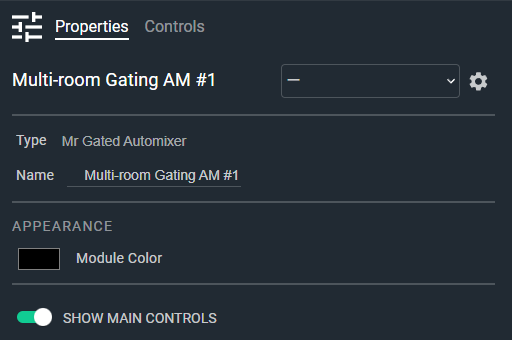
- Name: Type here to change the module name
- Appearance: Click on the colored box to change the module color
- Show Main Controls: Determines if the main controls are shown; when disabled only the channel strips are shown. Default: Enable. Options: Disable|Enable
Tip
In a multi-room group, set Show Main Controls to Disable on the followers so that the channel strips of every signal path read as one continuous automixer. Hiding the main controls only changes the display: the main settings still apply to this signal path's Mix output, and you can still change them from the leader.
Controls
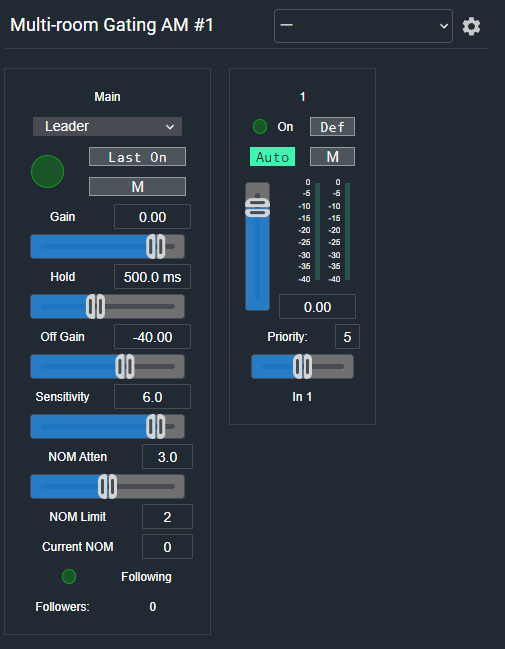
Main section:
- Mode (Droplist): Sets this signal path's role in the group:
Stand-alone,Leader, orFollower 1throughFollower 15. Default: Leader. - Mix Meter (LED, read-only): Audio level indicator for this signal path's automixed output.
- Last On (Button, toggle): Keeps the most recently open microphone open when no channel is active.
- Main Mute (Button, toggle): Mutes the mix output.
- Main Gain Readout (Numeric): Displays the main gain value. Type a value or use the Gain fader. Range: -72 to +12 dB, off at minimum.
- Main Gain (Fader): Adjusts the overall mix output gain.
- Main Hold Readout (Numeric): Displays the gate hold time. Range: 0.1 to 5 seconds. Default: 0.5 seconds.
- Main Hold (Fader): Sets how long a channel stays open after the talker stops.
- Main Off Gain Readout (Numeric): Displays the off-state gain value. Range: -90 to -10 dB. Default: -40 dB.
- Main Off Gain (Fader): Sets the gain applied to closed microphone channels.
- Main Sensitivity Readout (Numeric): Displays the gate sensitivity. Range: 3 to 25 dB above the measured noise floor. Default: 6 dB.
- Main Sensitivity (Fader): Sets how far a channel must rise above its noise floor to open.
- Main NOM Atten Readout (Numeric): Displays the NOM attenuation value. Range: 0 to 6 dB per doubling of open mics. Default: 3 dB.
- Main NOM Atten (Fader): Sets the attenuation applied as more microphones open.
- Main NOM Limit Readout (Numeric): Sets the maximum number of microphones open at once across the group. Range: 1 to 1024. Default: 2.
- Main Current NOM (Numeric, read-only): Displays the number of microphones currently open across the group.
- Following (LED, read-only): Indicates that this module is set to a follower number and is receiving valid leader information.
- Followers (Text, read-only): Displays how many followers are reporting to this leader, and
(conflict)when more than one follower shares a follower number.
Per channel:
- On (LED, read-only): Indicates whether this channel's gate is currently open.
- Def (Button, toggle): Sets this channel as the default microphone, held open when no channel is active.
- Auto (Button, toggle): Enables automatic gating for this channel. Default: Enabled.
- Mute (Button, toggle): Mutes this channel.
- Gain (Fader): Adjusts this channel's gain. Range: -72 to +12 dB, off at minimum.
- Input Meter (Meter, read-only): Displays the pre-gate input level for this channel.
- Gain Meter (Meter, read-only): Displays the gain the automixer is applying to this channel.
- Gain Readout (Numeric): Displays the current gain value for this channel.
- Priority (Numeric): Displays the gating priority for this channel. Range: 0 to 10. Default: 5.
- Priority (Fader): Sets the gating priority for this channel.
- Scribble (Text): Names this channel. Default: In 1, In 2, and so on.
I/O
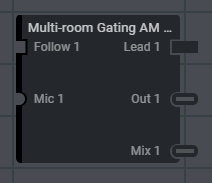
- Follow (Input, Control): 1 signal, 1 channel. Connect the leader's Lead output here when this module is a follower.
- Mic (Input, Audio): 1–64 signals, 1 channel
- Lead (Output, Control): 1 signal, 1 channel. Connect to the Follow input of each follower.
- Out (Output, Audio): 1–64 signals, 1 channel. Direct outputs, one per microphone input.
- Mix (Output, Audio): 1 signal, 1 channel. This signal path's automixed output, with main gain and mute applied.