Device
Overview
The Device API is a global variable table that allows the script access to various constants (and psuedo-constants) maintained by the main Device Firmware when online, or Composer when offline.
This is especially helpful for TCP/UDP communications to allow Intelligent Modules to be associated with a given 3rd party Dante device.
Device.
| Type | Comment | |
|---|---|---|
Device.Offline |
Bool | True if running offline in Composer |
Device.GetLastRecalledPreset |
String | Returns the remote name and the user name for the last recalled preset |
Device.RecallPreset(remoteName) |
Function | Recalls the specified Preset |
Device.Offline
Returns a Bool "true " if the script is running while Composer is Offline. Returns Bool "false" if the script is running while Composer is Online.
print(Device.Offline) >> false
if Device.Offline then
    --Do some stuff when Offline
else
    --Do different stuff when Online
end
Device.GetLastRecalledPreset
Returns two strings, the remote name and the user name for the last recalled preset. If none exists, returns nil for each.
print(Device.GetLastRecalledPreset) >> "Starting Preset"
Device.RecallPreset(remoteName)
Recalls the Preset specified using the remote name assigned to a preset which has been enabled for remote control. It returns a non-zero value if a preset of the specified remote name existed. Presets are recalled globally.
Device.RecallPreset("Starting Preset") >> 1
Device.LocalUnit
The Device.LocalUnit API returns information about the device on which the script is executing.
| Type | Comment | |
|---|---|---|
Device.LocalUnit.ControlIP |
String | Dotted IP address of network adapter used for control. |
Device.LocalUnit.AudioIP |
String | Dotted IP address of network adapter used for network audio. |
Device.LocalUnit.Name |
String | Network Name of the device running the script. |
Device.LocalUnit.Type |
Integer | Hardware type enumeration of the device running the script. |
Device.LocalUnit.TypeName |
String | Hardware type name of the device running the script. |
Device.LocalUnit.ControlIP
Returns the dotted IP address of the network adapter used for control. When Online, this will be the actual Control IP address of the device on which the script is executing.
print(Device.LocalUnit.ControlIP) >> 192.168.0.10
When Composer is Offline, it will return the IP address of the network adapter designated for Control in the Intelligent Module Options window.
Device.LocalUnit.AudioIP
Returns the dotted IP address of the network adapter used for network audio. When Online, this will be the actual Audio Network IP address of the device on which the script is executing.
print(Device.LocalUnit.AudioIP) >> 169.254.1.21
When Composer is Offline, it will return the IP address of the network adapter designated for Network Audio in the Intelligent Module Options window.
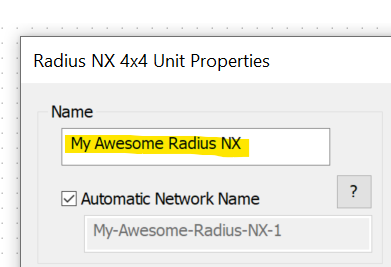
Device.LocalUnit.Name
Returns the Name of the device on which the script is executing. This behaves the same when running Offline or Online.
print(Device.LocalUnit.Name) >> My Awesome Radius NX-1
Device.LocalUnit.Type
Returns an enumeration for the type of device on which the script is executing. This behaves the same when running Offline or Online.
print(Device.LocalUnit.Name) >> 113
- Invalid = 0
- Edge = 36
- Solus NX 4x4 = 40
- Solus NX 8x8 = 41
- Solus NX 16x16 = 42
- Radius 12x8 = 43
- Radius 12x8 AEC = 46
- Radius 12x8 EX = 64
- Prism 4x4 = 71
- Prism 8x8 = 72
- Prism 12x12 = 73
- Prism 16x16 = 74
- Prism 0x0 = 104
- Radius NX 12x8 = 110
- Radius NX 4x4 = 113
Device.LocalUnit.TypeName
Returns the name of the type of device on which the script is executing. This behaves the same when running Offline or Online. This will be the same for all devices of the same time.
print(Device.LocalUnit.TypeName) >> Radius NX 4x4
Device.RemoteUnit
The Device.RemoteUnit API returns information about the associated User Library Dante Device and thus should only be used with these types of Intelligent Modules. If used in a script for a Stand Alone Intelligent Module, Device.RemoteUnit will return nil, thus any of the API calls will cause an error. To learn more about these two types of Intelligent Modules, see Creating Custom Intelligent Modules .
| Type | Comment | |
|---|---|---|
Device.RemoteUnit.IP |
String | Dotted IP address of Dante unit's control interface, if known. |
Device.RemoteUnit.Name |
String | Name of the Dante unit being controlled. |
Device.RemoteUnit.Type |
Integrer | Hardware type enumeration of Dante unit being controlled. |
Device.RemoteUnit.TypeName |
String | Hardware type name of Dante unit being controlled. |
Device.RemoteUnit.DanteIP |
String | Dotted IP address of Dante unit's audio interface. |
Device.RemoteUnit.DanteMAC |
String | MAC address of Dante unit in the form of XX:XX:XX:XX:XX. |
Device.RemoteUnit.DanteName |
String | Dante name of Dante unit being controlled. |
Device.RemoteUnit.DanteModel |
String | Model name of Dante unit being controlled. |
Device.RemoteUnit.DanteMfg |
String | Manufacturer name of Dante unit being controlled. |
Device.RemoteUnit.IP
Returns the dotted IP address of the network adapter used for control of the associated Dante Device if known. When Online, this will be the actual Control IP address of the associated Dante Device.
print(Device.RemoteUnit.IP) >> 192.168.0.10
Device.RemoteUnit.Name
Returns the Network Name of the associated Dante Device. This behaves the same when running Offline or Online. This will be unique for all devices in your Site.
print(Device.RemoteUnit.Name) >> My Cool Dante Mic
Device.RemoteUnit.Type
Returns an enumeration for the type of the associated Dante Devices. This behaves the same when running Offline or Online.
print(Device.RemoteUnit.Type) >> 94
Device.RemoteUnit.TypeName
Returns the name of the type of the associated Dante Device. This behaves the same when running Offline or Online. This will be the same for all devices of the same type.
print(Device.RemoteUnit.TypeName) >> Audio-Technica-ATND971
Device.RemoteUnit.DanteIP
Returns the dotted IP address of the network adapter used for the Dante network of the associated Dante Device. This behaves the same when running Offline or Online.
print(Device.RemoteUnit.DanteIP) >> 169.254.1.21
Device.RemoteUnit.DanteMAC
Returns the MAC address of the network adapter used for the Dante network of the associated Dante Device. This behaves the same when running Offline or Online.
print(Device.RemoteUnit.DanteMAC) >> 12:34:56:78:90:11
Device.RemoteUnit.DanteName
Returns the Dante Name of the associated Dante Device. This behaves the same when running Offline or Online. This will be unique for all devices in your Site.
print(Device.RemoteUnit.DanteName) >> My Cool Dante Mic
Device.RemoteUnit.DanteModel
Returns the Dante Model Name of the associated Dante Device. This behaves the same when running Offline or Online. This will be the same for all products of the same model.
print(Device.RemoteUnit.DanteModel) >> ATND971
Device.RemoteUnit.DanteMfg
Returns the Dante Manufacturer Name of the associated Dante Device. This behaves the same when running Offline or Online. This will be the same for all products with the same manufacturer.
print(Device.RemoteUnit.DanteMfg) >> Audio-Technica
Usage Examples
The following examples illustrate how these can be used:
Example 1 – Check and make sure it is a good IP before using
Because the IP address may not be valid yet, you should check before using it.
--state
validIP = false

function TimerClick ()
    --Check if IP was previously marked as valid
    if validIP ~= true then
       --If not yet valid, check if IP is Valid
        if Device.LocalUnit.ControlIP ~= "0.0.0.0" then
            --If valid, mark it as so for future use
            validIP = true
        end
        --if not valid, try again next time timer fires
    else
        --do communications using the validated IP address
    end
end

MyTimer = Timer.New()
MyTimer.EventHandler = TimerClick
MyTimer:Start(.5)