Basic Logic
Overview
Basic Logic applies a logic operation to its control inputs and sends the result to its control outputs. A control input counts as on when its value is above the midpoint between logic low (0) and logic high (100). Each output is either 0 or 100.
Select an operation using the AND, OR, NAND, NOR, XOR, XNOR, or NOT buttons. These controls operate like radio buttons: selecting one activates that operation and automatically deselects the others. AND is selected by default.
- AND: The output is on when every input is on.
- OR: The output is on when at least one input is on.
- NAND: The output is off when every input is on, and on otherwise.
- NOR: The output is off when at least one input is on, and on otherwise.
- XOR: The output is on when exactly one input is on. With more than two inputs, this is not the same as odd parity (on when an odd number of inputs are on): three inputs on gives an off output.
- XNOR: The output is off when exactly one input is on, and on otherwise.
- NOT: Each output is the inverse of the input with the same number. An output with no matching input stays off.
For every operation except NOT, all outputs carry the same result.

Properties
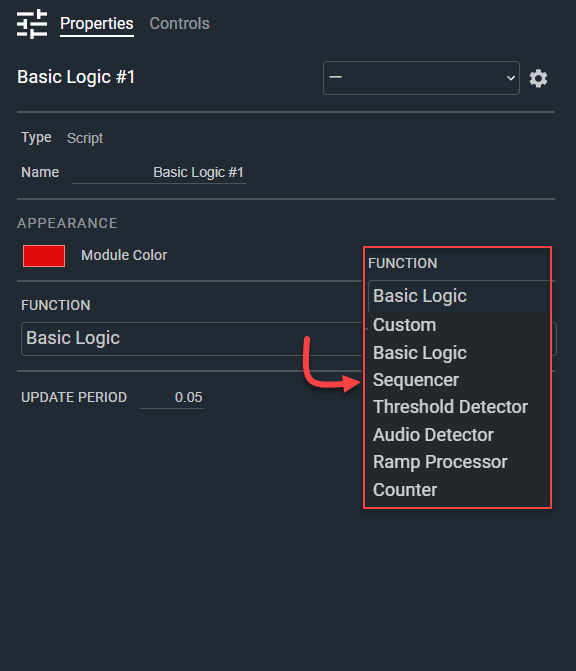
- Name: Type here to change the module name
- Appearance: Click on the colored box to change the module color
- Function: Selects a pre-built Intelligent Module, or build a custom one. Default: Basic Logic. Options: Custom|Basic Logic|Sequencer|Threshold Detector|Audio Detector|Ramp Processor|Counter|Scaler|Send Text
- Update Period: The rate that the control logic will update, 1 ms to 1 day in seconds. Default: .05. Range: 0.01–86400
Controls
Control Inputs:
Per control input-
- Level (Numeric, read-only): Displays the current control input signal value.
Parameters section:
- AND (Button, toggle): Selects the AND operation. Default: on.
- OR (Button, toggle): Selects the OR operation.
- NAND (Button, toggle): Selects the NAND operation.
- NOR (Button, toggle): Selects the NOR operation.
- XOR (Button, toggle): Selects the XOR operation.
- XNOR (Button, toggle): Selects the XNOR operation.
- NOT (Button, toggle): Selects the NOT operation.
Control Outputs:
Per control output-
- Level (Numeric, read-only): Displays the current control output signal value.
Status:
- Status (LED, read-only): Indicates script execution status.
I/O
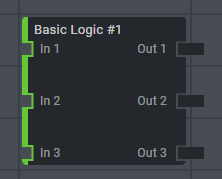
- A-In (Input, Audio): 0–64 signals, 1–64 channels
- In (Input, Control): 1–64 signals, 1 channel
- A-Thru (Output, Audio): 0–64 signals, 1–64 channels
- Out (Output, Control): 1–64 signals, 1 channel
Basic Logic turns off audio inputs, so the audio I/O is not used. You can set the number of control inputs and control outputs independently.