Control Selector
Overview
The Control Selector routes one of its control inputs to each of its control outputs. It works the way the Audio Input Selector does, but on control signals: each output has a Select droplist plus Previous and Next buttons, and whatever arrives on the selected input passes straight through to that output.
Control signals are not audio, so there is no gain, no mute and nothing to fade. A selection change takes effect on the next control pass, cleanly and without a click.
The module does not need to understand what a control signal carries. Whatever format arrives on the selected input is the format that leaves the output, so you can switch parameter values, strings, JSON, camera control, beamformer data, MIDI, or the coordination signals the multi-room automixers use.
Note
The most common use is choosing which automixer leads a room. Feed several leaders' Lead outputs into a Control Selector and route its output to a follower's Follow input, and the selection decides which group that signal path joins. See Multi-room Gating Automixer and Multi-room Gain Sharing Automixer.
How Selection Works
Each output selects independently, so one module can serve several destinations from the same set of inputs.
- Select lists every input by the name of whatever drives it rather than by input number, so a list of automixer leaders reads as leader names. An input with nothing connected to it falls back to
In 1,In 2, and so on. - Previous and Next step one input at a time. They stop at the first and last input rather than wrapping, and they repeat while you hold them.
- Inputs have no controls of their own. Each one shows a Connected indicator and a line of text naming what is arriving.
When the selected input is carrying nothing live, the output passes that along rather than holding the last value. Everything downstream then falls back to its own unconnected behavior — a multi-room automixer follower, for example, goes back to arbitrating its own mics.
Reading the Input Status
Each input shows two read-only indicators:
- Connected lights when the input is wired and carrying a recognized control format. It stays dark when nothing is connected, and also when the source is sending an inactive signal — a multi-room automixer set to stand-alone, or a follower that has lost its leader, is the usual case.
- Source names the format followed by the name of whatever drives the signal, such as
Gated AM: Main Room Leader. Formats are reported as Parameter, Gated AM, Gain-sharing AM, String, JSON, Visca, Beamformer or MIDI. An input carrying a format this module does not recognize readsUnrecognized, and an input with nothing live on it shows only the source name, if there is one.
Properties
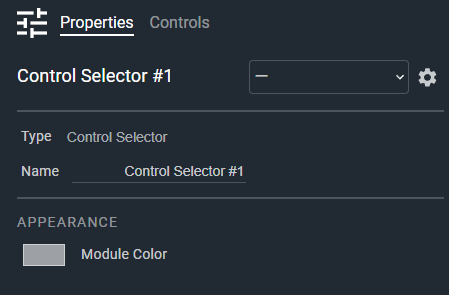
- Name: Type here to change the module name
- Appearance: Click on the colored box to change the module color
Controls
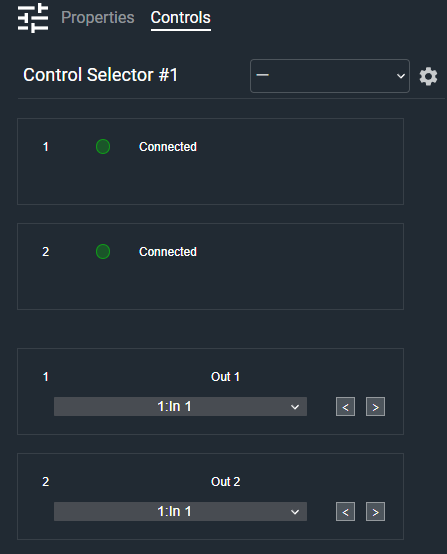
Per input:
- Connected (LED, read-only): Indicates that this input is wired and carrying a recognized control format.
- Source (Text, read-only): Displays the format arriving on this input and the name of the signal driving it.
Per output:
- Output Label (Text): Names this output. Default: Out 1, Out 2, and so on.
- Select (Droplist): Selects which input is routed to this output. Entries are named by their source.
- Previous (Button, momentary): Selects the previous input. Stops at the first input, and repeats while held.
- Next (Button, momentary): Selects the next input. Stops at the last input, and repeats while held.
I/O
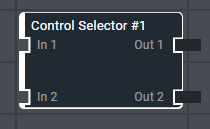
- In (Input, Control): 1–64 signals, 1 channel
- Out (Output, Control): 1–64 signals, 1 channel