Smart Device Properties
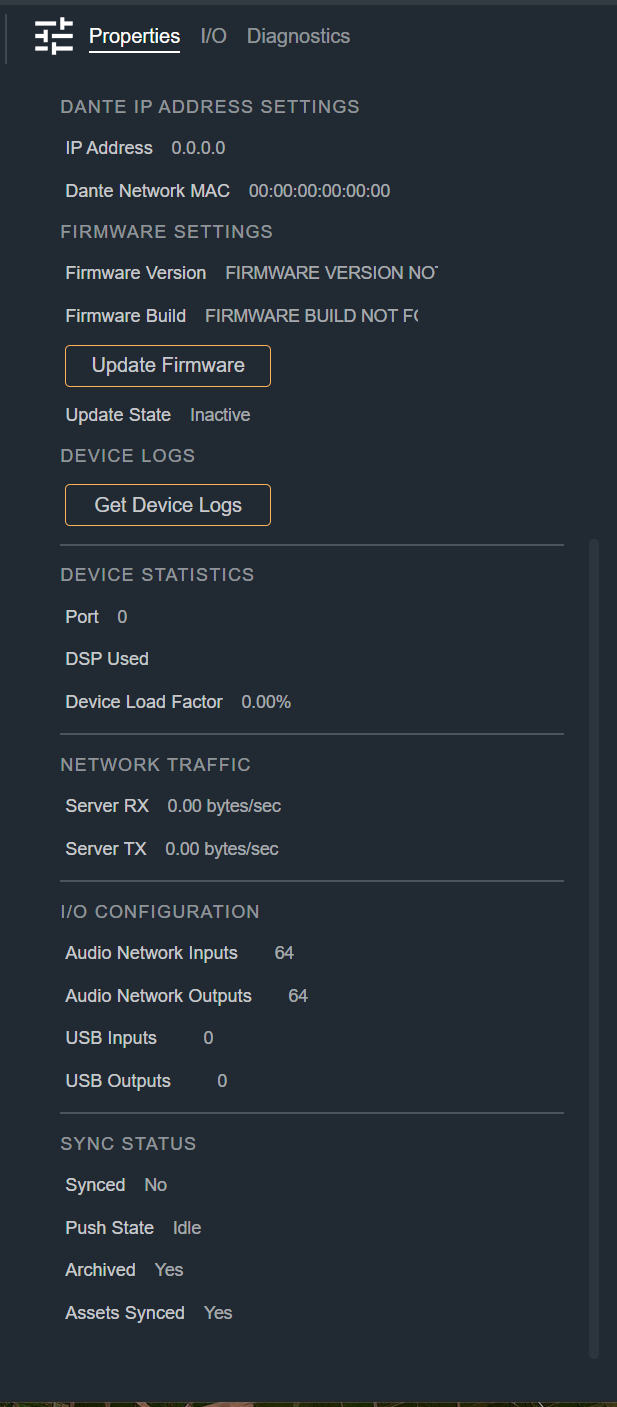
The following information is shown in the Properties tab of the Modifier Panel when a Smart Device is selected in Site View. This is where you configure the Smart Device for the desired operation.
Most fields in this tab are read-only and report the current status of the paired hardware. The editable fields are the Custom Name and the Pairing Settings, which you use to bind the Smart Device in your design to a physical device on the network.
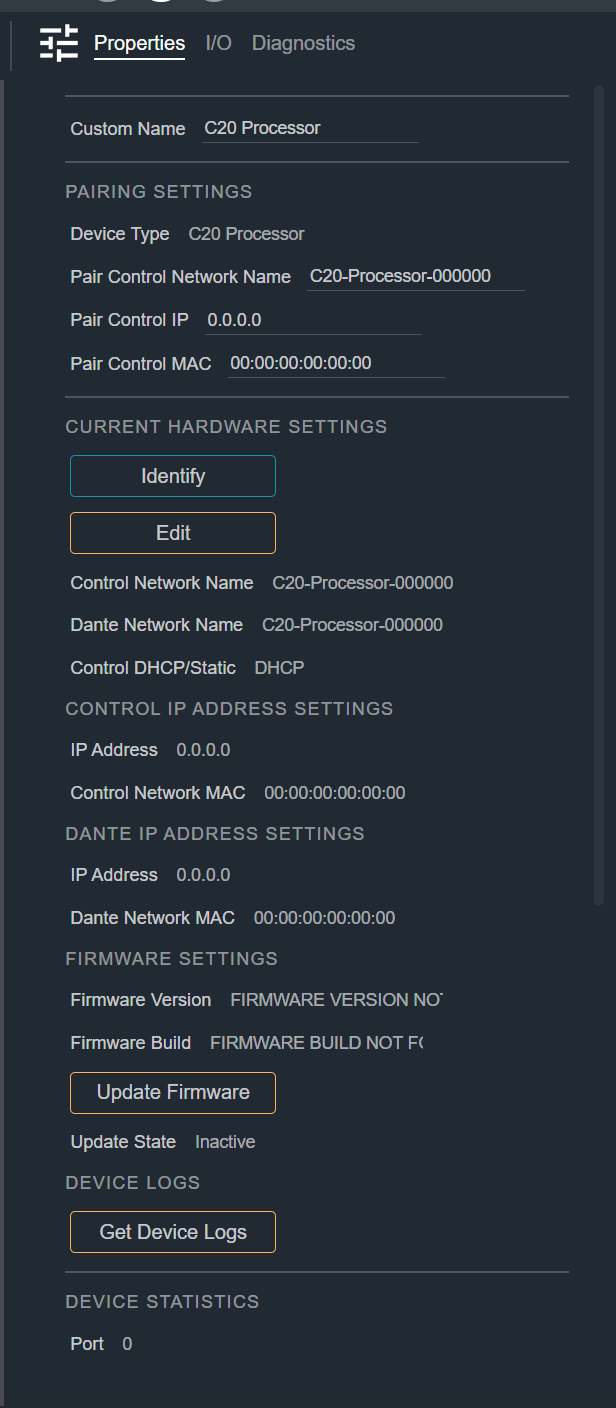
Custom Name
A user-defined name for the Smart Device. Enter a name that helps you identify the device within your design.
Colons (:) are not allowed in the name and are blocked as you type.
Pairing Settings
Pairing binds the Smart Device in your design to a specific piece of hardware on the network. The fields in this section are editable only while the device is unpaired — once a device is paired, they are locked to prevent the design from losing sync with the hardware. Enter values for one or more of these fields to define the Network Name, IP and/or MAC address a device should pair. When clicking a devices Pair button, an online Device with matching MAC, IP or Network name will be automatically paired. If no matching devices exists, the normal manual pairing flow will be used. Unpair a device to change these settings.
| Field | Description |
|---|---|
| Device Type | Read-only. The product name of the device. |
| Pair Control Network Name | The control network name used to pair with the hardware. |
| Pair Control IP | The control network IP address used to pair with the hardware. |
| Pair Control MAC | The control network MAC address used to pair with the hardware. |
Current Hardware Settings
This section reports the settings currently reported by the paired hardware and provides actions you can perform on the device.
- Identify — Flashes the front-panel display of the hardware so you can locate it physically. The device must be paired.
- Open Web App — Opens the device's web interface in your browser at its control IP address. The device must have a valid IP address.
- Edit DHCP/Static IP - Opens a modal dialog to change the devices IP Settings. See below for details.
Control IP Address Settings
Read-only details for the device's control network connection.
| Field | Description |
|---|---|
| IP Source | DHCP or Static |
| IP Address | The control network IP address of the device. |
| MAC Address | The control network MAC address of the device. |
| Mask | The subnet mask, which defines the range of addresses on the local control network. |
| Gateway | The address of the router the device uses to reach other networks. |
| DNS 1 | The primary DNS server the device uses to resolve host names. |
| DNS 2 | The backup DNS server, used when the primary is unavailable. |
Dante IP Address Settings
Read-only details for the device's Dante (audio) network connection.
| Field | Description |
|---|---|
| IP Source | DHCP or Static |
| IP Address | The Dante network IP address of the device. |
| MAC Address | The Dante network MAC address of the device. |
| Mask | The subnet mask, which defines the range of addresses on the local Dante network. |
| Gateway | The address of the router the device uses to reach other networks. |
Changing the Devices IP Settings
After pressing the "Edit DHCP/Static IP" button, a modal dialog will be displayed for changing these settings.
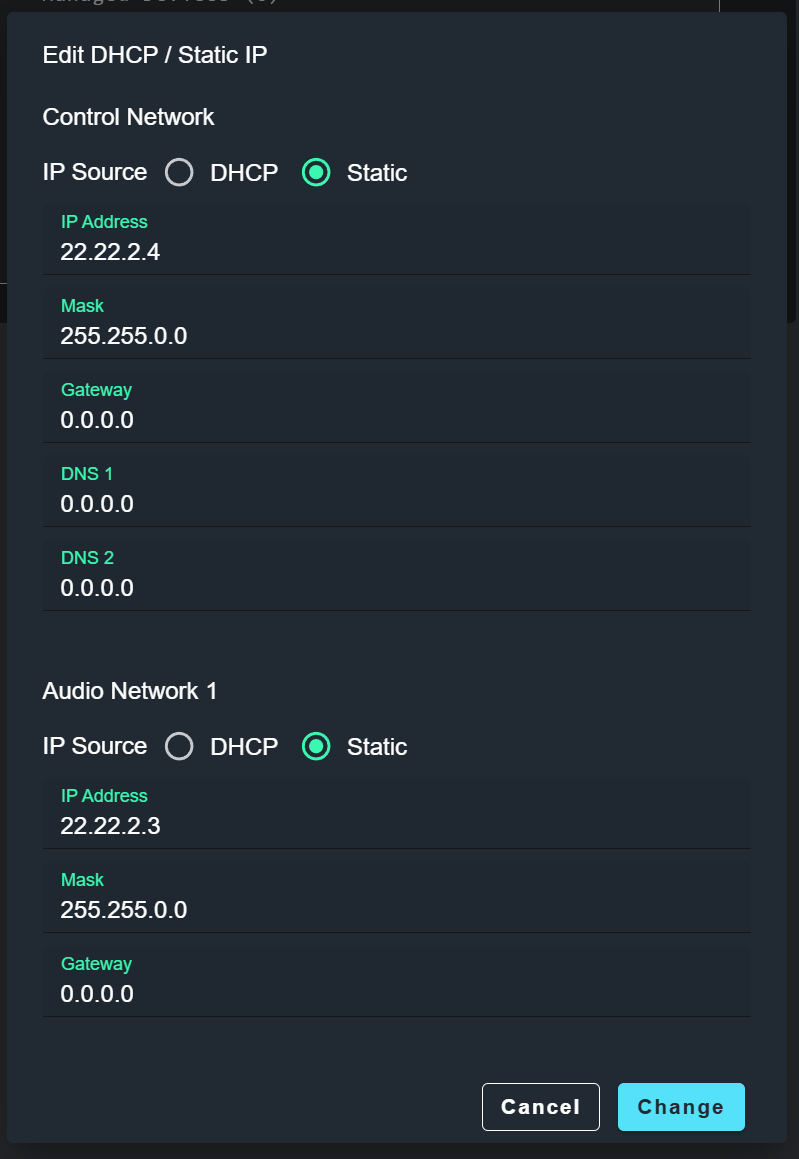
For both the control network and Dante Network, the following values may be changed. After clicking change, if all the values are valid, the change will be applied. An error may be presented if there are any problems with the combination of values that must be addressed.
| Field | Description |
|---|---|
| IP Source | DHCP or Static. The rest of the fields are only shown if Static is chosen. |
| IP Address | The IP address of the device on that network. |
| MAC Address | The MAC address of the device on that network. |
| Mask | The subnet mask, which defines the range of addresses on the local network. |
| Gateway | The address of the router the device uses to reach other networks. |
| DNS 1 | The primary DNS server the device uses to resolve host names. |
| DNS 2 | The backup DNS server, used when the primary is unavailable. |
Firmware Settings
Reports the firmware on the paired hardware and lets you update it.
- Update Firmware — Opens a file picker to select a firmware file (
.cfw) and push it to the device. This action is available only when the device is paired and not already updating.
| Field | Description |
|---|---|
| Firmware Version | Read-only. The firmware version currently running on the device. |
| Firmware Build | Read-only. The firmware build currently running on the device. |
| Update State | Read-only. The current firmware update state reported by the hardware. Displays "Inactive" when no update is in progress. |
Device Logs
- Get Device Logs — Retrieves diagnostic logs from the hardware. You are prompted to choose a save location. The device must be paired.
Device Statistics
Read-only runtime statistics reported by the device.
| Field | Description |
|---|---|
| Port | The device communication port. |
| DSP Used | The percentage of DSP resources currently in use. |
| Device Load Factor | The overall processing load on the device. |
Network Traffic
Read-only measurements of data exchanged with the device.
| Field | Description |
|---|---|
| Server RX | The rate of data received from the device, in bytes per second. |
| Server TX | The rate of data sent to the device, in bytes per second. |
I/O Configuration
Read-only counts of the device's available input and output channels.
| Field | Description |
|---|---|
| Audio Network Inputs | The number of audio network input channels. |
| Audio Network Outputs | The number of audio network output channels. |
| USB Inputs | The number of USB input channels. |
| USB Outputs | The number of USB output channels. |
Sync Status
Read-only indicators showing whether the device configuration and assets are synchronized.
| Field | Description |
|---|---|
| Synced | Whether the device configuration is synced. |
| Push State | The current push operation state (Idle, Pending, In Progress, Complete, or Failed). |
| Archived | Whether the device is archived. |
| Assets Synced | Whether the device assets are synced. |